Contents
- Index
Timer Time dialog:
Accessed from either the Popup menu or the Timer menu 'Time'. Enables you to set times for individual timers.
There are two modes of operation, relative, where times are relative to the origin which will be zero if the sequence is stopped or the time the sequence was started if running and 'Real time' if 'Real time' is checked. 'Real time' will only be available if:
a)The sequence is running or paused.
b)The sequence is stopped but a schedule is set to run.
If a schedule is set to run:
If 'Real time' is checked and the sequence is stopped, the date and time are the date and time the alarm will go off once the schedule has started and the dialog looks like this:
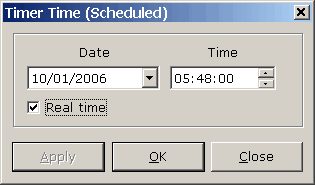
In the above the timer was 14hrs 48 minutes from the origin but schedule was set to start at 18:00hrs the previous day. The picture below shows what it looked like as a relative time.
Note: There is no checking for overlap. If you set an hourly schedule and the last timer is more than one hour from the origin the scheduled start will just be ignored.
If 'Real time' is not checked, the number of days and time is the time vector from when the schedule will start and looks like this:
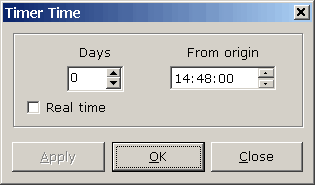
In the case above, if the schedule was set to start at midnight the alarm would go off at 2:48PM the following afternoon.
Click Apply to apply any changes you have made. Clicking OK will close the dialog and automatically apply any changes you have made. Clicking Close will close the dialog without applying changes.
Copyright© 2004:2006 Gordon