Contents
- Index
Properties: Date and Time
Accessed from Timer>Properties or right click over a timer and select properties. It's easier to set times by moving with the mouse and keyboard, see Moving timers
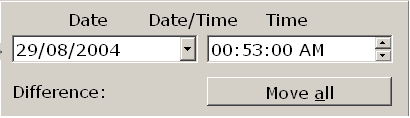
Sets the date and time of the currently active/selected timer. Disabled unless the check box to the left is checked.
If the sequence is running the date picker will show and the date will be that of the active timer and time settings are 'real'.
If the sequence isn't running the date picker will be replaced by a spin edit box which when it shows will be zero and times are relative.
If the 'Move all' button is down, all timers to the right of and including the active one will be moved by the difference between the value when the dialog opened and the value when the OK button is clicked.
Warning:
If the time you have set is going to result in the timer being out of view you will be warned before the setting is applied and given the opportunity to cancel. Take care with settings that are a long way out of view as you won't be able to move them with the mouse and moving them with the keyboard can take some time. If you do inadvertently set them a long way over to the right, the best way to recover is to increase the maximum time span until they're in view, move them back with the mouse then reset the time span.
Copyright© 2004:2006 Gordon