Contents
- Index
- Previous
- Next
Maximum time span:
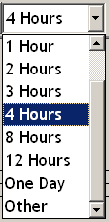
Accessed as a drop down list on the toolbar or as a dialog from: main menu>Options>Maximum time span
Sets the maximum time span for visible timers. You would normally set this to a value slightly longer than the maximum time from now you expect to need. It can be changed at any time but the closer it is to the time needed will result in you having finer control over the timers when setting times with the mouse which is by far the quickest and easiest way to set timers.
Having a maximum less than your expected last timer doesn't prevent you from having timers beyond 'now' + Maximum time span, it just means you won't be able to adjust them with the mouse and you won't be able to see them although you will be able to see how much time from 'now' is left to go as the time from now 'label' never leaves the window.
Clicking the last item opens the Maximum Time Span dialog for ranges not available on the list.
Copyright© 2004:2006 Gordon