Contents - Index - Previous - Next
 on the toolbar in the program.
 button on the toolbar in the program window - this will add three timers to your job. Other similar buttons will add one two and four respectively but for now we'll use three as we'll need three to illustrate selections later. Click the left most timer and make a mental note of the time displayed on the label above it.
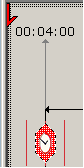 At this point displayed times are relative to the zero origin - that is, if the label above a timer, as seen to the left here, shows 4 minutes, then that timer will fire four minutes from when you press the start
  button. To start the session, click the start button in the program now. As you click notice that the time you noted before, now displays as a real time which is when the timer will fire.
  button on the toolbar in the program window.
  button on the toolbar in the program window. If the session is paused you'll have to resume, then stop.