Contents
- Index
Properties:Launch
Accessed from either Timer>Properties or by right clicking over a timer and selecting Properties.
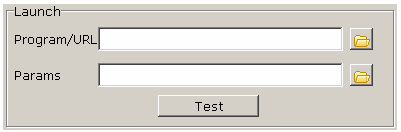
Put the full path to the program you wish to launch in the Program edit box and additional parameters in the Parameters edit box. Do not surround the program or parameters in double quotes, the program will do this for you if necessary.
'Program' can be a data file such as C:\Program Files\MGCSoft\TikTokToDo\TipsText.txt. In which case 'Parameters' should be left empty. Which application or program TipsText.txt is opened with depends on which program, files with the extension .txt are configured to open with on your particular machine. see 'associating extensions with file types' in Windows help.
If 'Program' is an executable file such as Notepad.exe then parameters are either command line switches or a data file the program is able to open.
The 'Test' button runs the launch program and/or parameters just as it would when the program is running which allows you to make sure everything is as it should be.
The example shows Windows Notepad as the program and tipstext.txt as the file (parameters) for Notepad to open. This particular example will work only if Notepad is in the default directory/folder. TipsText.txt works in this case without the full path to the program as it happens to be in the program folder itself.
see also: The Time pointer properties dialog.
Copyright© 2004:2006 Gordon