Contents
- Index
Closing the program:
Some safeguards have been implemented to prevent accidental changing of timers and closing of the program. Tiny fingers and little paws have the unfortunate knack of being able to hit the right key at the wrong time!
If there are any unexpired timers a warning will be given on closing the program giving you the chance to abort the close action or ignore the warning and close anyway.
In addition: If there are any unexpired timers and all timers are locked you will see an error dialog like this:
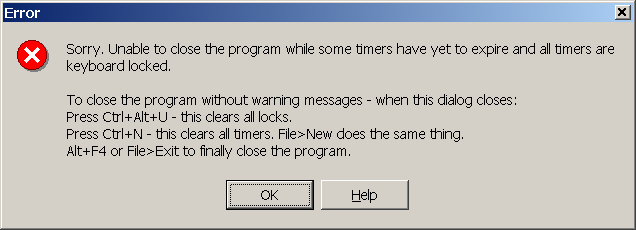
You won't be able to close the program down, without removing the locks. Once you have closed the dialog you can remove all locks with the special keyboard combination of Ctrl+Alt+U regardless of whether Options>Allow keyboard unlocking is enabled. This might sound like a contradiction but Ctrl+Alt+U is fairly difficult to do by accident. Ctrl+Alt+U only removes the locks, it doesn't prevent the unexpired timers warning from appearing.
To ensure the program closes without warnings: Press Ctrl+Alt+U then Ctrl+N and finally Alt+F4 to close the program. This removes all locks, clears all timers and closes the program.
Copyright© 2004:2006 Gordon